내 웹사이트에 룰렛 추가하기
공개 룰렛만 가능해요.
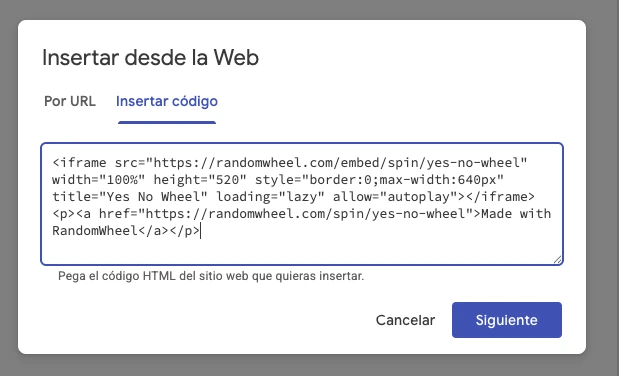
임베드 코드
<iframe src="https://randomwheel.com/embed/spin/yes-no-wheel" width="100%" height="520" style="border:0;max-width:640px" title="Yes No Wheel" loading="lazy" allow="autoplay"></iframe>
<p><a href="https://randomwheel.com/spin/yes-no-wheel">Made with RandomWheel</a></p>
방문자에게는 이렇게 보여요.
사이트에 추가하는 방법
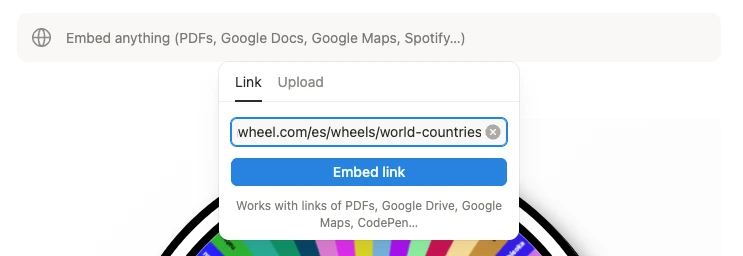
Notion과 Canva에서는 링크를 붙여넣으세요. 그 외에는 위 상자의 코드를 붙여넣으세요.
- Notion에서 /embed를 입력하고 Embed anything을 고르세요.
- 룰렛 링크를 붙여넣고 Embed link를 누르세요.
- 아래쪽 모서리를 끌면 룰렛이 커져요.
자주 묻는 질문
- 비공개 룰렛도 임베드할 수 있나요?
- 안 돼요. 내 사이트의 방문자는 여기에 로그인돼 있지 않아서 공개 룰렛만 작동해요. 저장 후에는 공개 여부를 바꿀 수 없으니 같은 선택지로 공개 룰렛을 새로 만드세요.
- 나중에 수정해도 룰렛이 계속 작동하나요?
- 네. 임베드에는 항상 룰렛의 최신 버전이 보여요.
- 무료인가요?
- 네, 무료예요. 한 가지 부탁은 코드에 딸린 작은 "Made with RandomWheel" 링크를 그대로 두는 거예요. 사람들이 이 사이트를 찾아오는 길이니까요.
- 바로 돌리는 룰렛도 되나요?
- 네, 전부 돼요. 고른 버전까지 그대로요. 예를 들어 포켓몬 한 세대만, 대륙 하나만 같은 식이에요.
개발자를 위한 안내
모든 공개 룰렛과 바로 돌리는 룰렛은 maxwidth와 maxheight를 포함한 oEmbed와 디스커버리를 지원해요. 엔드포인트:
GET https://randomwheel.com/oembed?url=https%3A%2F%2Frandomwheel.com%2Fspin%2Fyes-no-wheel&format=json
GET https://randomwheel.com/oembed?url=<wheel page url, encoded>&format=json&maxwidth=480&maxheight=400
같은 디스커버리 정보는 HTTP Link 헤더로도 함께 보내고, 플레이어는 어떤 출처에서든 iframe 표시를 허용해요.
Link: <https://randomwheel.com/embed/<slug>>; rel="iframely player"; type="text/html"; media="aspect-ratio: 640/520; max-width: 640",
      <https://randomwheel.com/oembed?url=...>; rel="alternate"; type="application/json+oembed"
직접 iframe을 만들 때 쓰는 플레이어 URL이에요. sound, title, idle은 선택 사항이에요:
https://randomwheel.com/embed/<slug>?sound=1&title=1&idle=0
https://randomwheel.com/embed/spin/<preset>?variant=<variant>
아직 룰렛이 없나요?
1분 만에 만들고 저장한 뒤 여기로 돌아와 코드를 받으세요.